Getting Started with “Layouts”#
Layout (definitions) are a mean to validate the setup and metadata content of an HDF5 file. The h5rdmtoolbox provides a way which allows defining exected dataset, groups, attributes and properties. This is intended to be used as a validation step before any further handling with an HDF5 file.
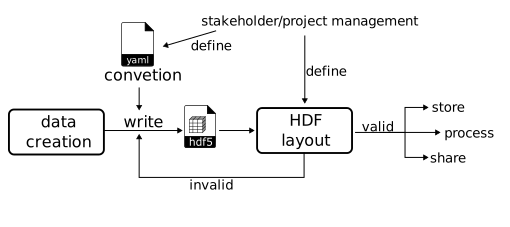
Different to conventions, a layout validates an existing HDF5 files. The below image illustrates a typical workflow:
The file is created while a convention may be in place. The convention supports during the creation process and makes sure that some required data will be available. However, it is not possible to capture all requirements, especially structural ones, e.g. a certain dataset must exist.
The structural and conditional testing can be described by means of a layout definition. A layout validates an already written file. If it succeeds, follow-up steps like sharing, storing or additional processing steps could take place.
Let’s learn about it by practical examples:
from h5rdmtoolbox import layout # import the layout module
1. Create a layout#
The core class is called Layout, which will take so-called (layout) specifications:
lay = layout.Layout()
Currently, the layout has no specifications:
lay.specifications
[]
1.1 Adding a specification#
Let’s add a specification. For this we call .add(). We will add information for a query request, which will be performed later, when we validate a file (layout).
The most important argument of a specification is a query-function. It can be any function that returns a list of HDF5 objects which are found based on keyword arguments requested by that function.
Such a query function exists in h5rdmtoolbox, see the HDF5 database class: h5rdmtoolbox.database.hdfdb.FileDB.
As a first example, we request the following for all files to be validated with our layout:
all dataset must be compressed with “gzip”
the dataset with name “/u” must exist
from h5rdmtoolbox.database import hdfdb
# the file must have datasets (this spec makes more sense with the following spec)
spec_all_dataset = lay.add(
    hdfdb.FileDB.find,  # query function
    flt={},
    objfilter='dataset',
    n={'$gte': 1},  # at least one dataset must exist
    description='At least one dataset exists'
)

# all datasets must be compressed with gzip (conditional spec. only called if parent spec is successful)
spec_compression = spec_all_dataset.add(
    hdfdb.FileDB.find,  # query function
    flt={'$compression': 'gzip'},  # query parameter
    n=1,
    description='Compression of any dataset is "gzip"'
)

# the file must have the dataset "/u"
spec_ds_u = lay.add(
    hdfdb.FileDB.find,  # query function
    flt={'$name': '/u'},
    objfilter='dataset',
    n=1,
    description='Dataset "/u" exists'
)

# we added one specification to the layout:
lay.specifications
[LayoutSpecification(description="At least one dataset exists", kwargs={'flt': {}, 'objfilter': 'dataset'}),
 LayoutSpecification(description="Dataset "/u" exists", kwargs={'flt': {'$name': '/u'}, 'objfilter': 'dataset'})]
Note: We added three specifications: The first (spec_all_dataset) and the last (spec_ds_u) specification were added to layout class. The second specification (spec_compression) was added to the first specification and therefore is a conditional specification. This means, that it is only called, if the parent specification was successful. Also note, that a child specification is called on all result objects of the parent specification. In our case, spec_compression is called on all datasets objects in the file.
lay.specifications[0].specifications
[LayoutSpecification(description="Compression of any dataset is "gzip"", kwargs={'flt': {'$compression': 'gzip'}})]
2. Validate a file#
Example data
To test our layout, we need some example data
import h5rdmtoolbox as h5tbx
with h5tbx.File() as h5:
    h5.create_dataset('u', shape=(3, 5), compression='lzf')
    h5.create_dataset('v', shape=(3, 5), compression='gzip')
    h5.create_group('instruments', attrs={'description': 'Instrument data'})
    h5.dump()
-
-
(3, 5) [float32]
-
(3, 5) [float32]
-
- description: Instrument data
-
Let’s perform the validation. We expect one failed validation, because dataset “u” has the wrong compression type:
res = lay.validate(h5.hdf_filename)
2025-11-21_16:18:32,315 ERROR [core.py:330] Applying spec. "LayoutSpecification(description="Compression of any dataset is "gzip"", kwargs={'flt': {'$compression': 'gzip'}})" failed due to not matching the number of results: 1 != 0
res.specifications[0].specifications[0].results[0].validation_flag
10
The summary gives a comprehensive set of information about the performed calls on targets (datasets or groups) and their outcomes:
res.print_summary(exclude_keys=['id', 'kwargs', 'func'])
Summary of layout validation
+----------+--------+------------------------+--------------------------------------+---------------+---------------+
| called   |   flag | flag description       | description                          | target_type   | target_name   |
|----------+--------+------------------------+--------------------------------------+---------------+---------------|
| True     |      1 | SUCCESSFUL             | At least one dataset exists          | Group         | tmp0.hdf      |
| True     |     10 | FAILED, INVALID_NUMBER | Compression of any dataset is "gzip" | Dataset       | /u            |
| True     |      1 | SUCCESSFUL             | Compression of any dataset is "gzip" | Dataset       | /v            |
| True     |      1 | SUCCESSFUL             | Dataset "/u" exists                  | Group         | tmp0.hdf      |
+----------+--------+------------------------+--------------------------------------+---------------+---------------+
--> Layout validation found issues!
The error log message shows us that one specification was not successful. The is_valid() call therefore will return False, too:
res.is_valid()
False
hdfdb.FileDB(h5.hdf_filename).find({'$compression': 'gzip'})
[<LDataset "/v" in "/home/docs/.local/share/h5rdmtoolbox/2.5.2/tmp/tmp_1/tmp0.hdf" attrs=()>]
The “compression-specification” got called twice and failed one (for dataset “u”):
spec_compression.n_calls, spec_compression.n_fails
(2, 1)