Catalog – Working with Distributed HDF/RDF Data#
The approach proposed by h5rdmtoolbox is based on publishing HDF5 data files together with their semantic metadata (e.g. RDF/Turtle files). These resources can be hosted on any suitable platform, such as Zenodo.
Core idea#
The concept separates data storage from semantic exploration:
HDF5 files efficiently store large, multidimensional numerical data.
RDF files capture semantic metadata; they are lightweight and well suited for querying and exploration.
Users typically inspect and process the RDF metadata first (RDF Store), and only download the corresponding HDF5 files on demand (HDF Store) when detailed data access is required.
Catalog-driven data selection#
To define which datasets are relevant for a given context or scope, a catalog file is used.
This catalog is provided as a Turtle file and models its information using the
dcat:Catalog vocabulary.
The catalog acts as an entry point that references all relevant source files (both RDF and HDF5).
Workflow overview#
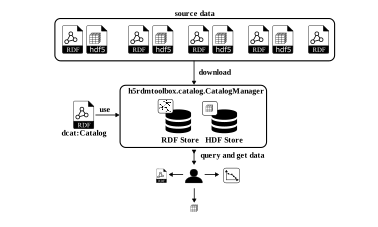
The diagram below illustrates this workflow:
A
dcat:Catalogdescribes and references the available source datasets.Users interact with the catalog via the
CatalogManagerprovided byh5rdmtoolbox.Through this interface, RDF metadata can be queried and processed (RDF Store).
Associated HDF5 data files are downloaded only when needed (e.g. for in-depth analysis) (HDF Store).
Define the Scope → dcat:Catalog#
The catalog’s RDF data defines which datasets are within the scope of the current analysis or workflow.
In other words, the dcat:Catalog specifies what data should be considered and where it can be found.
The catalog is provided as a Turtle (TTL) file. This file can either be:
Written manually, giving full control over the catalog structure and metadata, or
Generated programmatically using
ontolutils, which helps create standards-compliant RDF with less boilerplate.
from ontolutils.ex import dcat
catalog = dcat.Catalog(
    id="https://example.org/tutorial-catalog",
    dataset=dcat.Dataset(
        id="https://doi.org/10.5281/zenodo.18187577",
        identifier="18185973",
        distribution=[
            dcat.Distribution(
                id="https://doi.org/10.5281/zenodo.18187577#random_temperature_data.ttl",
                title="random temperature data (metadata)",
                identifier="random_temperature_data.ttl",
                downloadURL="https://zenodo.org/records/18187577/files/random_temperature_data.ttl",
                mediaType="text/turtle"
            ),
            dcat.Distribution(
                id="https://doi.org/10.5281/zenodo.18187577#random_temperature_data.hdf",
                title="random temperature data (data)",
                identifier="random_temperature_data.hdf",
                downloadURL="https://zenodo.org/records/18187577/files/random_temperature_data.hdf",
                mediaType="application/x-hdf"
            ),
            dcat.Distribution(
                id="https://doi.org/10.5281/zenodo.18187577#/random_velocity_data.ttl",
                title="random temperature velocity (metadata)",
                identifier="random_velocity_data.ttl",
                downloadURL="https://zenodo.org/records/18187577/files/random_velocity_data.ttl",
                mediaType="text/turtle"
            ),
            dcat.Distribution(
                id="https://doi.org/10.5281/zenodo.18187577#random_velocity_data.h5",
                title="random velocity data (data)",
                identifier="random_velocity_data.hdf",
                downloadURL="https://zenodo.org/records/18187577/files/random_velocity_data.h5",
                mediaType="application/x-hdf"
            )
        ]
    )
)
print(catalog.serialize("ttl"))
@prefix dcat: <http://www.w3.org/ns/dcat#> .
@prefix dcterms: <http://purl.org/dc/terms/> .

<https://example.org/tutorial-catalog> a dcat:Catalog ;
    dcat:dataset <https://doi.org/10.5281/zenodo.18187577> .

<https://doi.org/10.5281/zenodo.18187577> a dcat:Dataset ;
    dcterms:identifier "18185973" ;
    dcat:distribution <https://doi.org/10.5281/zenodo.18187577#/random_velocity_data.ttl>,
        <https://doi.org/10.5281/zenodo.18187577#random_temperature_data.hdf>,
        <https://doi.org/10.5281/zenodo.18187577#random_temperature_data.ttl>,
        <https://doi.org/10.5281/zenodo.18187577#random_velocity_data.h5> .

<https://doi.org/10.5281/zenodo.18187577#/random_velocity_data.ttl> a dcat:Distribution ;
    dcterms:identifier "random_velocity_data.ttl" ;
    dcterms:title "random temperature velocity (metadata)" ;
    dcat:downloadURL <https://zenodo.org/records/18187577/files/random_velocity_data.ttl> ;
    dcat:mediaType <https://www.iana.org/assignments/media-types/text/turtle> .

<https://doi.org/10.5281/zenodo.18187577#random_temperature_data.hdf> a dcat:Distribution ;
    dcterms:identifier "random_temperature_data.hdf" ;
    dcterms:title "random temperature data (data)" ;
    dcat:downloadURL <https://zenodo.org/records/18187577/files/random_temperature_data.hdf> ;
    dcat:mediaType <https://www.iana.org/assignments/media-types/application/x-hdf> .

<https://doi.org/10.5281/zenodo.18187577#random_temperature_data.ttl> a dcat:Distribution ;
    dcterms:identifier "random_temperature_data.ttl" ;
    dcterms:title "random temperature data (metadata)" ;
    dcat:downloadURL <https://zenodo.org/records/18187577/files/random_temperature_data.ttl> ;
    dcat:mediaType <https://www.iana.org/assignments/media-types/text/turtle> .

<https://doi.org/10.5281/zenodo.18187577#random_velocity_data.h5> a dcat:Distribution ;
    dcterms:identifier "random_velocity_data.hdf" ;
    dcterms:title "random velocity data (data)" ;
    dcat:downloadURL <https://zenodo.org/records/18187577/files/random_velocity_data.h5> ;
    dcat:mediaType <https://www.iana.org/assignments/media-types/application/x-hdf> .
Instantiate the CatalogManager#
To instantiate the CatalogManager, we first define a working directory that is used to store local files and intermediate results.
Next, we configure the RDF store and the HDF store:
For RDF data, we use a local RDF store based on
rdflib.Graph.
This lightweight solution is fully sufficient for the scope of this tutorial.Alternatively, an external triple store such as GraphDB can be used.
This option offers better performance and scalability for larger catalogs and more complex queries.The HDF store manages access to the referenced HDF5 files and handles downloading them on demand.
With these components in place, the CatalogManager provides a unified interface for querying RDF metadata and accessing the corresponding HDF5 data.
from h5rdmtoolbox.catalog import CatalogManager, InMemoryRDFStore, HDF5FileStore

import pathlib
working_dir = "local-db"
pathlib.Path(working_dir).mkdir(exist_ok=True)
cm = CatalogManager(
    catalog=catalog,
    working_directory=working_dir
)
in_memory_store = InMemoryRDFStore(cm.rdf_directory, formats="ttl")
cm.add_main_rdf_store(in_memory_store)
cm.download_metadata()
cm.main_rdf_store.populate(recursive=True)
InMemoryRDFStore()
data_store = HDF5FileStore(data_directory="local-db/hdf")
cm.add_hdf_store(data_store)
Let’s check how many triples are loaded to the graph:
len(cm.main_rdf_store.graph)
170
Perform a Query#
To search the catalog semantically, we define a SPARQL query (SparqlQuery) and execute it against the RDF store.
The query is evaluated on the semantic metadata only, making it lightweight and efficient.
The query result is returned as a Result object, which exposes the data as a pandas DataFrame (.data) for convenient inspection and further processing within the notebook.
This allows users to explore and filter available datasets based on their metadata before accessing the underlying HDF5 data.
In the example below, we search for all subjects that define a unit, using the predicate m4i:hasUnit.
from h5rdmtoolbox.catalog import SparqlQuery
query = SparqlQuery(
    query="""PREFIX m4i: <http://w3id.org/nfdi4ing/metadata4ing#>

SELECT * WHERE {?s m4i:hasUnit ?o}
""",
    description="Selects all triples with predicate m4i:hasUnit"
)
res = query.execute(cm.main_rdf_store)
res.data
| s | o | |
|---|---|---|
| 0 | https://doi.org/10.5281/zenodo.18187577#random... | http://qudt.org/vocab/unit/MilliM-PER-SEC |
| 1 | https://doi.org/10.5281/zenodo.18187577#random... | http://qudt.org/vocab/unit/K |
| 2 | https://doi.org/10.5281/zenodo.18187577#random... | m/s |
Use Case: Inspect a Dataset with a Specific Standard Name#
Assume that one of the HDF5 datasets in the catalog is annotated with the standard name x_velocity using the hdf attribute “standard_name”.
Our goal is to locate this dataset via its semantic metadata and visualize its data.
To achieve this, we proceed in two steps:
Identify the dataset semantically by querying the RDF metadata for the given standard name.
Access and plot the underlying HDF5 array once the matching dataset has been found.
As a first step, we define a helper function that generates the required SPARQL query.
This function, find_dataset_with_standard_name, returns a SparqlQuery object tailored to search for datasets with a specific standard name.
def find_dataset_with_standard_name(standard_name_str):
    query = f"""PREFIX hdf: <http://purl.allotrope.org/ontologies/hdf5/1.8#>

                SELECT ?dataset ?standard_name
                WHERE {{
                    ?dataset a hdf:Dataset ;
                             hdf:attribute ?attribute .

                    ?attribute a hdf:StringAttribute ;
                        hdf:data \"{standard_name_str}\" .
                }}"""
    return SparqlQuery(
        query=query,
        description=f"Selects dataset with standard name '{standard_name_str}'"
    )
Generate and apply the query:
new_query = find_dataset_with_standard_name("x_velocity")
res = new_query.execute(cm.main_rdf_store)
We should find exactly one entry:
res.data
| dataset | |
|---|---|
| 0 | https://doi.org/10.5281/zenodo.18187577#random... |
Now that we found the HDF5 dataset, we need to identify in which File (distribution) it exists:
def find_distribution_based_on_hdf_dataset_iri(hdf_dataset_iri):
    query = f"""PREFIX dcat: <http://www.w3.org/ns/dcat#>
                PREFIX hdf:  <http://purl.allotrope.org/ontologies/hdf5/1.8#>

                SELECT ?fileId ?downloadURL
                WHERE {{
                    ?fileId a hdf:File ;
                          dcat:downloadURL ?downloadURL ;
                          hdf:rootGroup ?root .

                    ?root (hdf:member)* <{hdf_dataset_iri}> .
                }}"""
    return SparqlQuery(
        query=query,
        description=f"Finds fileID and downloadURL for hdf dataset iri '{hdf_dataset_iri}'"
    )
distribution_url_query = find_distribution_based_on_hdf_dataset_iri(res.data["dataset"][0])
download_url_res = distribution_url_query.execute(cm.main_rdf_store)
Upload the identified HDF5 file to the HDF5 Store#
We found the distribution (=hdf file) with its downloadURL. In order to use it we need to register it in the HDF5 Store:
h5_dist = dcat.Distribution(id=download_url_res.data["fileId"][0], downloadURL=download_url_res.data["downloadURL"][0])
cm.hdf_store.upload_file(distribution=h5_dist)
Inspect the HDF5 file:#
with cm.hdf_store.open(h5_dist) as h5:
    h5.dump(collapsed=False)
-
- description
 https://schema.org/description: h5rdmtoolbox test data showing random velocity data
-
(3) [int64]
-
(time: 3) [float64]
- standard_name https://matthiasprobst.github.io/ssno#hasStandardName: x_velocity
- units http://w3id.org/nfdi4ing/metadata4ing#hasUnit: m/s
- description
 https://orcid.org/0000-0001-8729-0482