Extensions#
The wrapper class functionalities can be extended using composition or inheritance.
The concept of composition adds a component to a composite class. The relationship is such, that the composite class does not know the component class but wise versa. This allows to add additional functionality without changing the original code. Adding components to an existing wrapper class will be called “registering” here.
Concretely, four different so-called accessory classes are implemented:
VectorMagnitudenormalizeto_units
These accessories interfaces must be activated by an import call. They generally are designed such, that they are called on a dataset or group with respective arguments, which prepares a the action being performed when data is selected. Best is, to learn by example:
import h5rdmtoolbox as h5tbx
h5tbx.use(None)
using("h5py")
1. Vector#
The Vector extension returns a xr.Dataset. First specify which of the datasets from the HDF5 should be contained in the resulting xr.Dataset. Then, index the data array using numpy notation or sel() or isel(). Only then, the data is loaded from the file:
from h5rdmtoolbox.extensions import vector # make `Vector` appear as a property of groups
import numpy as np

with h5tbx.File() as h5:

    h5.create_dataset('x', data=[1, 2, 3], make_scale=True, attrs={'units': 'm'})
    h5.create_dataset('y', data=[1, 2, 3, 4], make_scale=True, attrs={'units': 'm'})
    h5.create_dataset('u', data=np.random.random((4, 3)), attach_scales=('y', 'x'),
                     attrs=dict(units='m/s', long_name='x vel'))
    h5.create_dataset('v', data=np.random.random((4, 3)), attach_scales=('y', 'x'),
                     attrs=dict(units='m/s'))

    vec = h5.Vector(xvel='u', yvel='v')[1:3]
vec
<xarray.Dataset> Size: 136B
Dimensions:  (y: 2, x: 3)
Coordinates:
  * y        (y) int64 16B 2 3
  * x        (x) int64 24B 1 2 3
Data variables:
    xvel     (y, x) float64 48B 0.4863 0.7232 0.6846 0.5804 0.2588 0.8214
    yvel     (y, x) float64 48B 0.5093 0.7842 0.4181 0.2113 0.655 0.004033
Attributes:
    long_name:  x vel
units: m/s2. Magnitude#
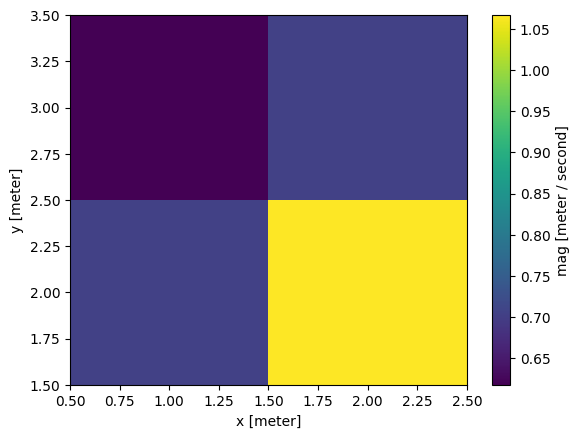
Similar to Vector, the Magnitude accessory takes two or more datasets and calculates the magnitude from them. Again, data is only loaded after the involved dtasets are specified. If unit attributes are given, the calculation will check for mismatching units.
from h5rdmtoolbox.extensions import magnitude
with h5tbx.File(h5.hdf_filename) as h5:
    mag = h5.Magnitude('u', 'v', name='mag')[1:3, 0:2]
mag.plot()
<matplotlib.collections.QuadMesh at 0x7cff87d1b490>
3 Normalization#
Data is generally stored in one form (and physical unit) in the HDF5 file. However, in some scientific cases, data may be required in a normalized value.
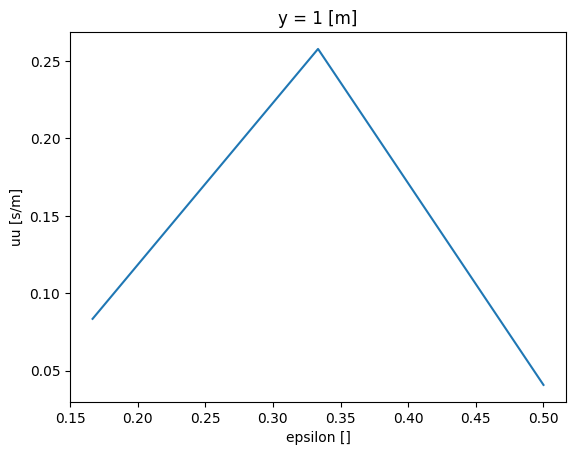
Consider the following example of a velocity dataset. The accessory normalize allows to normalize the data values or the coordinates.
We will show two scenarios: Either the data values are normalized or the attached coordinates, too (or both).
from h5rdmtoolbox.extensions import normalize
Normalize the data by various reference values, here x_ref and phi. Note, that a unit may be provided:
with h5tbx.File() as h5:
    h5.create_dataset('x', data=[1, 2, 3], make_scale=True, attrs={'units': 'm'})
    h5.create_dataset('y', data=[1, 2, 3, 4], make_scale=True, attrs={'units': 'm'})
    h5.create_dataset('u', data=np.random.random((4, 3)), attach_scales=('y', 'x'))
    h5.create_dataset('v', data=np.random.random((4, 3)), attach_scales=('y', 'x'))

    x_norm = h5.x.normalize(x_ref='2 m', phi=3)[1]

x_norm
<xarray.DataArray 'x/x_ref/phi' ()> Size: 8B
0.3333
Attributes:
units: Now, let’s normalize the velocity “u” and its coordinate x:
with h5tbx.File(h5.hdf_filename) as h5:
    u_norm = h5.u.normalize(u_ref='2 m/s', name='uu').x(x_ref='2 m', phi=3, name='epsilon').isel(y=0)
u_norm
<xarray.DataArray 'uu' (epsilon: 3)> Size: 24B
0.08352 0.2577 0.04088
Coordinates:
    y        int64 8B 1
  * epsilon  (epsilon) float64 24B 0.1667 0.3333 0.5
Attributes:
units: s/mu_norm.plot()
[<matplotlib.lines.Line2D at 0x7cff87cb2d70>]
4. Converting units#
The accessory “to_units” will convert the selected data to the desired units. This assumes, that the unit attribute is called “units”. It is also possible to change the units of attached dimensions. In the following examples this is done.
Note, that not the dataset values itself changes in the file, but whatever data is accessed by the following slice operation.
from h5rdmtoolbox.extensions import units
with h5tbx.File(mode='w') as h5:
    h5.create_dataset('x', data=[1, -4.5, 5.71], attrs={'units': 'm'},
                          make_scale=True)
    ds = h5.create_dataset('u', data=[1, -4.5, 5.71], attrs={'units': 'm/s'},
                           attach_scale='x')
    u_mm = h5.u.to_units('mm/s', x='mm')[1:2]
u_mm
<xarray.DataArray 'u' (x: 1)> Size: 8B
-4.5e+03
Coordinates:
  * x        (x) float64 8B -4.5e+03
Attributes:
units: mm/s5. Ontology accessory (under development)#
The idea of the onto accessory is to quickly enrich a group with FAIR metadata, e.g. by adding a person to an HDF5 file:
from h5rdmtoolbox.extensions import onto
with h5tbx.File() as h5:
    g = h5.onto.create_person(orcid_id='https://orcid.org/0000-0000-0000-0000',
                          first_name='John',
                          last_name='Doe')
    h5.dump()
-
-
- first_name
 http://xmlns.com/foaf/0.1/firstName: John
 - last_name http://xmlns.com/foaf/0.1/lastName: Doe
- orcid_id http://w3id.org/nfdi4ing/metadata4ing#orcidId:
 https://orcid.org/0000-0000-0000-0000
- first_name
-
Custom accessory#
Besides the already implemented ones, users can register custom accessories, too. In the following example, we add “device” as a “property with methods”. So “device” appears as a property which has a method “add”. Such an implementation facilitates the interaction with HDF data, too. Note, that this “property-like” accessory is available for all Dataset objects from now on in this session:
from h5rdmtoolbox import register_accessor

@register_accessor('device', h5tbx.Dataset, overwrite=True)
class DeviceProperty:
    """Device Accessor class"""

    def __init__(self, ds):
        self._ds = ds
        self._device_name = 'NoDeviceName'

    def add(self, new_device_name):
        """adds the attribute device_name to the dataset"""
        self._ds.attrs['device_name'] = new_device_name

    @property
    def name(self):
        return self._ds.attrs['device_name']
with h5tbx.File() as h5:
    ds = h5.create_dataset('test', shape=(2,))
    print(type(ds))
    ds.device.add('my device')
    print(ds.device.name)
<class 'h5rdmtoolbox.wrapper.core.Dataset'>
my device
/home/docs/checkouts/readthedocs.org/user_builds/h5rdmtoolbox/envs/stable/lib/python3.10/site-packages/h5rdmtoolbox/wrapper/core.py:1053: H5pyDeprecationWarning: Creating a dataset without passing data or dtype is deprecated. Pass an explicit dtype. Using dtype='f4' will keep the current default behaviour.
  _ds = super().create_dataset(