Zenodo#
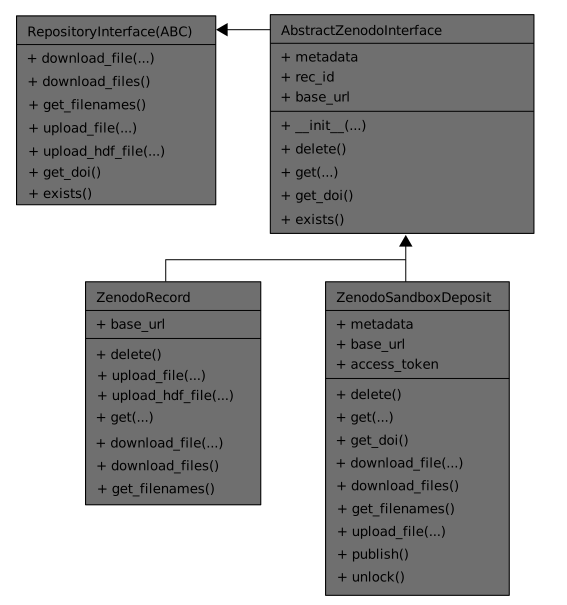
There are two types of Zenodo interfaces. One interfaces to the public repositories (ZenodoRecord), the other is for testing and accessed the sandbox server (ZenodoSandboxDeposit).
The class diagram below shows how they are constructed. First, an abstract zenodo interface class (AbstractZenodoInterface) is derived. From this, the concrete interface classes are derived.
Example usage#
The example below will upload an HDF file to the sandbox server:
from h5rdmtoolbox.repository import zenodo
import h5rdmtoolbox as h5tbx
Init a Repo:
repo = zenodo.ZenodoSandboxDeposit(None)
Create a test file:
with h5tbx.File() as h5:
    h5.create_dataset('velocity', shape=(10, 30), attrs={'units': 'm/s'})
filename = h5.hdf_filename
Prepare metadata
from h5rdmtoolbox.repository.zenodo import metadata
from datetime import datetime

meta = metadata.Metadata(
    version="0.1.0-rc.1+build.1",
    title='[deleteme]h5tbxZenodoInterface',
    description='A toolbox for managing HDF5-based research data management',
    creators=[metadata.Creator(name="Probst, Matthias",
                      affiliation="KIT - ITS",
                      orcid="0000-0001-8729-0482")],
    contributors=[metadata.Contributor(name="Probst, Matthias",
                              affiliation="KIT - ITS",
                              orcid="0000-0001-8729-0482",
                              type="ContactPerson")],
    upload_type='image',
    image_type='photo',
    access_right='open',
    keywords=['hdf5', 'research data management', 'rdm'],
    publication_date=datetime.now(),
    embargo_date='2020'
)
Add (and publish) the metadata:
repo.metadata = meta
Upload the HDF5 file. Note, that there’s a difference between upload_file and upload_hdf_file. The latter not just uploads the HDF5 file but also generates a metadata file and uploads it, too. The reason behind it is, that the HDF5 file can be very large. Before downloading the (large) HDF5 file, the user may want to review the metadata content first. This is possible through the “metamapper-function” which needs to be provided during upload.
import pathlib
from h5rdmtoolbox import jsonld
class HDF_to_JSONLD:
    def __init__(self, skipND):
        self.skipND = skipND

    def __call__(self, hdf_filename):
        json_filename = pathlib.Path(hdf_filename).with_suffix('.json')
        with open(json_filename, 'w') as f:
            f.write(jsonld.dump_file(hdf_filename, skipND=self.skipND))
        return json_filename
repo.upload_hdf_file(filename, metamapper=HDF_to_JSONLD(1))
List the just uploaded files, by requesting the current filenames in the repository:
repo.get_filenames()
{'tmp0.json': {'id': '58ca2923-ad4f-408e-a552-26a57c83e822',
  'filename': 'tmp0.json',
  'filesize': 1043,
  'checksum': '401872532bc3532ec307606e88492354',
  'links': {'self': 'https://sandbox.zenodo.org/api/deposit/depositions/70842/files/58ca2923-ad4f-408e-a552-26a57c83e822',
   'download': 'https://sandbox.zenodo.org/api/records/70842/draft/files/tmp0.json/content'}},
 'tmp0.hdf': {'id': 'bb1a01ba-144e-4f9b-b953-6b40d5d2eb05',
  'filename': 'tmp0.hdf',
  'filesize': 6944,
  'checksum': '1169b5c09635913ac8e6606d86c40692',
  'links': {'self': 'https://sandbox.zenodo.org/api/deposit/depositions/70842/files/bb1a01ba-144e-4f9b-b953-6b40d5d2eb05',
   'download': 'https://sandbox.zenodo.org/api/records/70842/draft/files/tmp0.hdf/content'}}}